Embedding assemblies without ILMerge
If you want to package an application and its dependencies into a single executable, ILMerge is not the only option. .NET lets an application participate in assembly resolution by subscribing to AppDomain.AssemblyResolve. The handler returns a loaded System.Reflection.Assembly if it can resolve args.Name, or null otherwise. Registering the handler before a dependency is needed lets us load that assembly from the application’s embedded resources.
Create a Visual Studio solution with two projects: a Console Application and a Class Library. Add a reference from the console application to the library, then set the reference’s Copy Local property to False. After a build, the console application’s output directory will no longer contain ClassLib.dll:
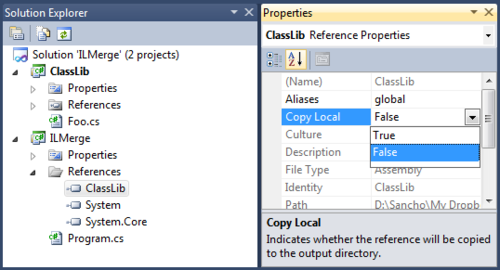
Next, embed the library assembly as a resource in the console application. Visual Studio can add the file, but the available options have drawbacks. Adding it normally copies it into the project, and that copy will not track changes to the Class Library project. Using Add as Link in the Add Existing Item dialog makes Visual Studio display the assembly’s directory hierarchy in the project tree. Neither approach gives us direct control over the resource name in the UI, so we will edit the project file instead.
Choose Unload Project from the console project’s context menu and open its .csproj file for editing. Add the library DLL as an embedded resource, using the assembly’s full identity as the resource name:
  <!-- ... -->

  <ItemGroup>
    <ProjectReference Include="ClassLib\ClassLib.csproj">
      <Project>{1F1F562F-3CDD-4996-89B0-A5EC2049474A}</Project>
      <Name>ClassLib</Name>
      <Private>False</Private>
    </ProjectReference>
  </ItemGroup>

  <!-- add this section -->
  <ItemGroup>
    <!-- specify the path to the library assembly -->
    <EmbeddedResource Include="ClassLib\bin\$(Configuration)\ClassLib.dll">
      <!-- use the full assembly identity as the resource name -->
      <LogicalName>ClassLib, Version=1.0.0.0, Culture=neutral, PublicKeyToken=null</LogicalName>
      <!-- hide the resource from the Visual Studio project tree -->
      <Visible>false</Visible>
    </EmbeddedResource>
  </ItemGroup>

  <Import Project="$(MSBuildToolsPath)\Microsoft.CSharp.targets" />

  <!-- ... -->
This still requires some manual configuration: the full assembly identity is hard-coded, the resource path depends on the other project’s output directory, and both projects must use matching configuration names through $(Configuration). It does automate the important part, though: rebuilding the library updates the embedded copy. Further MSBuild customization could remove these assumptions, for example by using the GetAssemblyIdentity task to obtain the assembly’s full identity automatically.
The remaining issue is timing: the AssemblyResolve handler must be registered before the dependency is needed. What if Main itself refers to a type in that assembly? The CLR may need to resolve dependencies while preparing a method for execution, before its body starts running. In this example, the handler is registered in the static constructor of the type containing the entry point, which runs before the body of Main:
using System;
using System.Reflection;

class Program
{
  static Program()
  {
    AppDomain.CurrentDomain.AssemblyResolve += (_, args) =>
    {
      byte[] rawAssembly;

      // search the current assembly's embedded resources
      // for a resource matching the requested assembly identity
      var assembly = Assembly.GetExecutingAssembly();
      using (var stream = assembly.GetManifestResourceStream(args.Name))
      {
        // return null if the assembly was not found
        if (stream == null) return null;

        // read the resource into a byte array
        rawAssembly = new byte[stream.Length];
        stream.Read(rawAssembly, 0, (int) stream.Length);
      }

      return Assembly.Load(rawAssembly);
    };
  }

  private static void Main()
  {
    ClassLib.Foo.SayHello();
    Console.ReadKey(true);
  }
}
The library contains:
namespace ClassLib
{
  public class Foo
  {
    public static void SayHello()
    {
      System.Console.WriteLine("Hello from ClassLib.Foo!");
    }
  }
}
With the embedded resource and resolver in place, the application can load the library without a separate DLL. This approach has several limitations:
- The
AssemblyResolvesubscription applies to a single application domain. Applications with multiple domains need to account for that. - Code loaded through
Assembly.Load(byte[])is likely to be JIT-compiled on each run. I have not verified whether native images can be used in this case. - Registering the handler in the entry-point type’s static constructor is specific to executable assemblies. A library has no single entry point, so finding a place to register the handler before any code needs its dependencies is less straightforward.
There are also useful advantages:
- The resolver can implement custom rules for selecting assembly versions and locating dependencies.
- Embedded assemblies can be compressed, for example with
System.IO.Compression.GZipStream, and decompressed during resolution to reduce the executable’s size.
Use this approach when you need control over assembly loading and understand the initialization and deployment constraints it introduces.